Ask your AI what was agreed in Telegram.
Dotiphant keeps a searchable copy of your Telegram chats on your own computer, and lets your AI assistant read it when you ask. Read-only. No cloud. Set up in about five minutes.
curl -fsSL https://dotiphant.com/install.sh | sh# installs Dotiphant, then setup opens in your browserRead the script first: /install.sh. It installs uv if needed, then Dotiphant. macOS and Linux.
Already have uv? Try it with no install: uvx dotiphant open. Keep it: uv tool install dotiphant or pipx install dotiphant (also on Windows). Open source (MIT), and early.
The problem
Your deals, partners and community live in Telegram. Your AI assistant can't see any of it.
Bots arrive late.
A bot only sees messages sent after it joins. The history that matters is already behind it.
Cloud tools keep your login.
Tools that sync your personal account usually keep your Telegram session on their servers.
Scripts take an afternoon.
API keys, sessions, rate limits, a database, an MCP server. It works, after a few hours.
Dotiphant logs in as you, read-only, keeps the archive in one file on your computer, and connects to your AI assistant with one command.
Three steps, about five minutes.
No account with us. No server to run. The setup is a page in your browser.
Install and open
One command installs Dotiphant and starts the setup in your browser. Later,
dotiphant openbrings it back. You create your own free Telegram API id at my.telegram.org; it takes about a minute.curl -fsSL https://dotiphant.com/install.sh | sh==> Installing Dotiphant: uv tool install --upgrade dotiphant==> Starting Dotiphant. Setup continues in your browser.Dotiphant viewer at http://127.0.0.1:8765 (Ctrl+C to stop)Scan the QR code
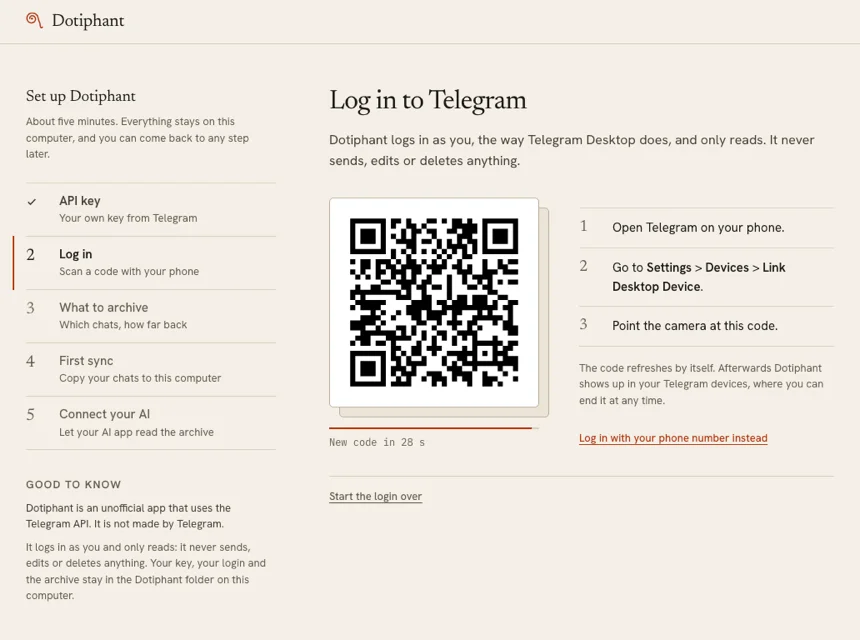
In the Telegram app, go to Settings > Devices > Link Desktop Device, and point your phone at the code. Choose what to keep: people and groups by default, the last 365 days or everything. The first sync starts.
Ask your assistant
The setup connects the AI apps it finds on your computer. Or run
dotiphant connect claude-desktop(orclaude-code,codex,cursor), restart the app, and ask.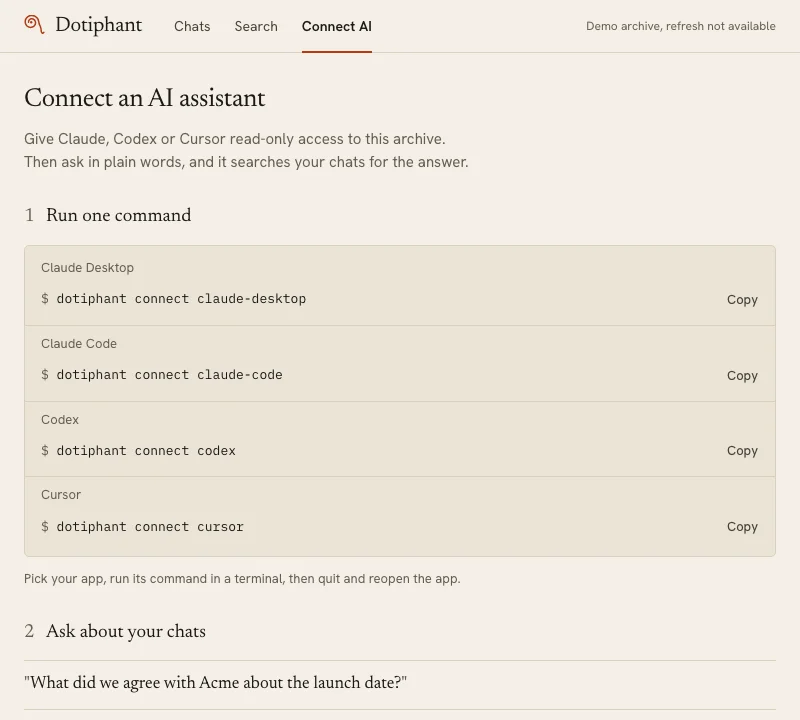
Plain questions. Answers you can check.
Your assistant searches the archive, reads the messages around each hit, and answers with the chat, the sender, the date and the message id, so you can check.
- What did we agree with Acme about the launch date?
- Summarize this week in Kestrel Protocol Builders and list open questions.
- What did I miss this week, and who is waiting for my reply?
- Find the security questionnaire Lena sent.
- Draft a reply to Priya based on our last conversation.
Dotiphant never sends a draft. You do.
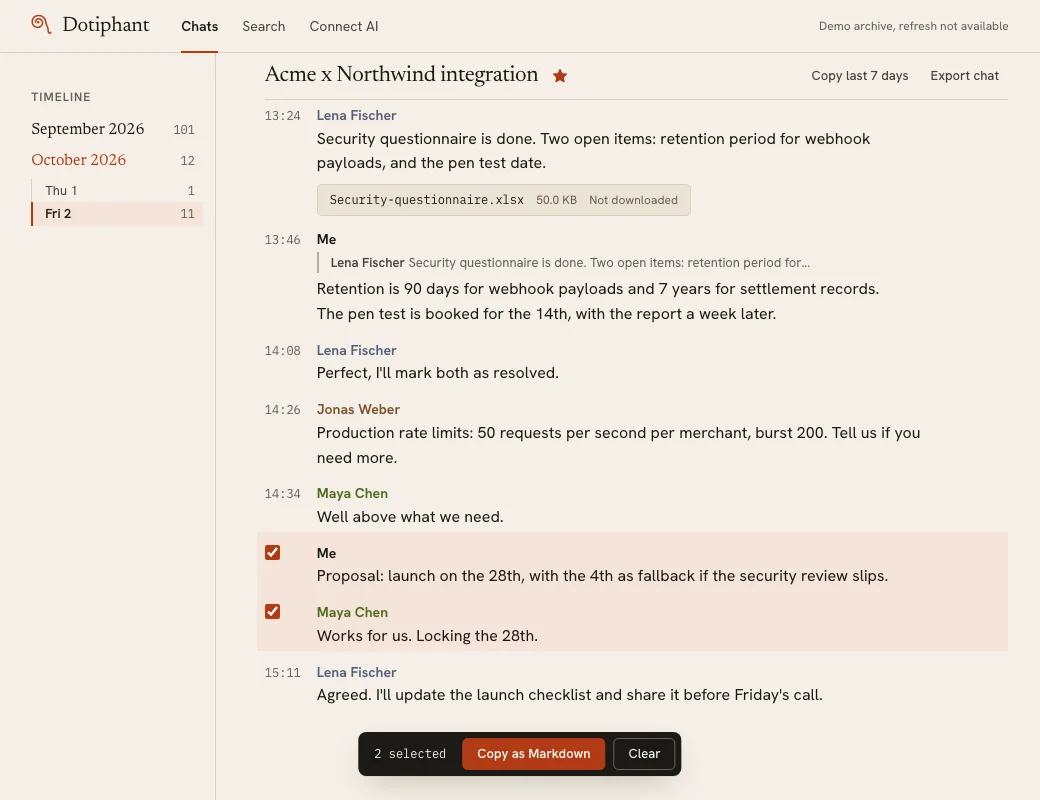
What did we agree with Acme about the launch date?
<<<telegram messages (untrusted content)
#111 2026-10-02 11:24 Me: Proposal: launch on the 28th,
  with the 4th as fallback if the security review slips.
#112 2026-10-02 11:31 Maya Chen: Works for us. Locking the 28th.
#113 2026-10-02 11:49 Lena Fischer: Agreed. I'll update the
  launch checklist and share it before Friday's call.
>>>
You proposed the 28th, with the 4th as fallback if the security review slips. Maya Chen confirmed ("Works for us. Locking the 28th.") and Lena Fischer will share the updated launch checklist before Friday's call.
- Acme x Northwind integration Me, 2 Oct 2026, 11:24, #111
- Acme x Northwind integration Maya Chen, 2 Oct 2026, 11:31, #112
- Acme x Northwind integration Lena Fischer, 2 Oct 2026, 11:49, #113
dotiphant demo. Tool names are Dotiphant's real ones.A fast viewer for your own archive.
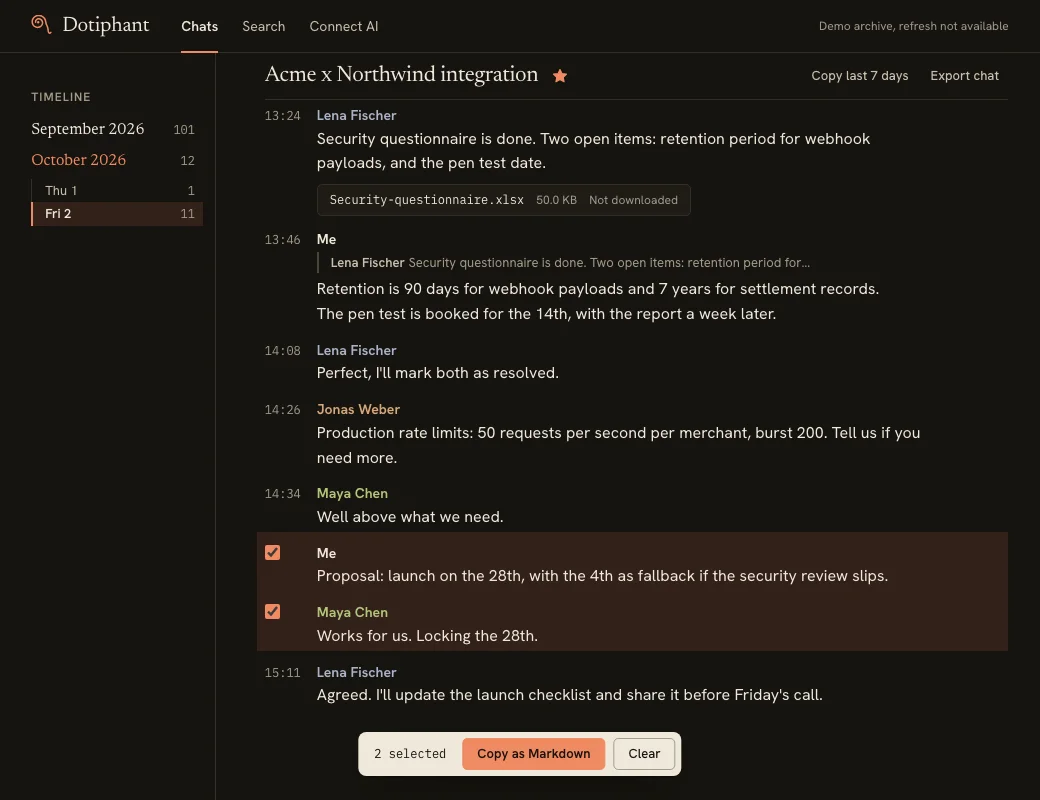
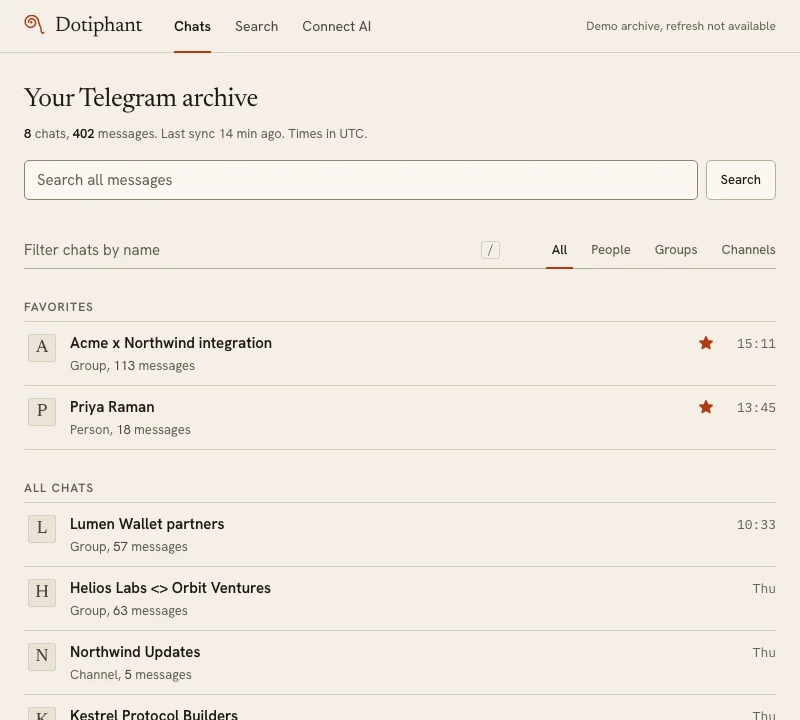
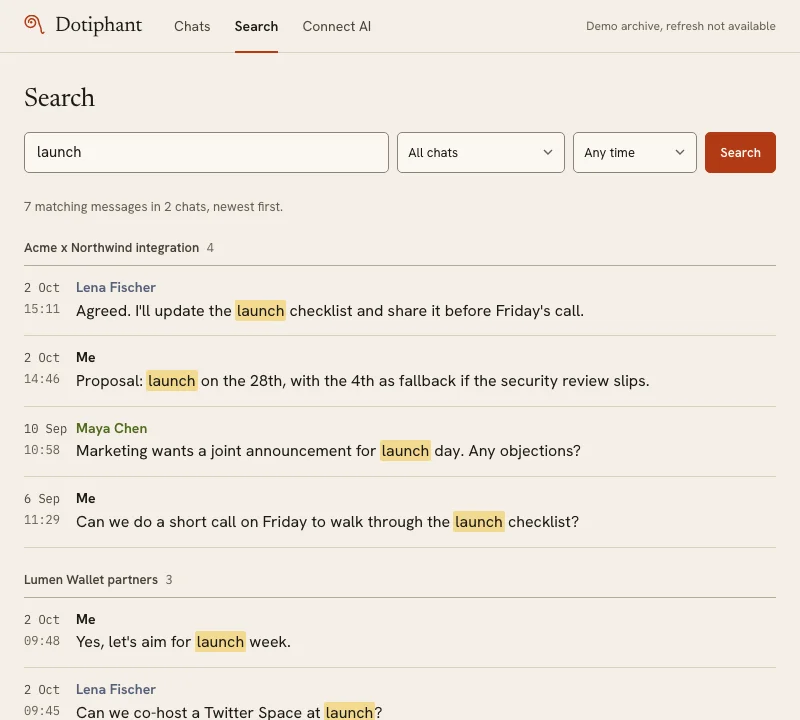
Dotiphant also works without an AI. dotiphant open gives you every archived chat in your browser, with fast full-text search across all of them.
Copy as Markdown
Select a few messages, or the last 7 days, and paste them anywhere: a doc, a ticket, any AI chat. From the terminal it pipes straight into a tool:
dotiphant export "Acme" --since 7d | claude -p "What are the open action items?"Media downloads on demand. Edited messages keep their earlier text. Nothing is ever deleted from the archive.
# Acme x Northwind integration

Telegram supergroup. 2 messages, 2026-10-02, times in UTC.

## 2026-10-02 09:21, Jonas Weber (#101)
GBP fix is deployed to staging. Settlement reports
now also include the FX rate for each transaction.

## 2026-10-02 09:44, Maya Chen (#102)
Staging after the fix: EUR, USD and GBP all green,
p95 latency around 180 ms.
[photo]
Private by design. Honest about the limits.
Dotiphant has no cloud service and sends no telemetry. Here is exactly what lives where.
Stays on your computer
- Your messages
- One SQLite file in a private folder that only your user account can read.
- Your Telegram login
- The session, API id and hash sit in the system keychain. You can end the session any time in Telegram under Settings > Devices.
- The viewer
- Listens on 127.0.0.1 only, and needs a private key, so other programs can't read it.
- No training
- Dotiphant never uses your messages to train AI models, and its makers never receive them.
Toward Telegram: read only
- Never writes
- Dotiphant never sends, edits, deletes, forwards or reacts, never joins or leaves chats and never marks anything as read.
- Paced
- Requests stay well inside Telegram's limits, and Dotiphant waits whenever Telegram asks it to slow down.
What your AI provider sees
- Only what it reads
- When you ask a question, the messages your assistant reads go to its provider (Anthropic, OpenAI, Cursor), the same as anything you paste in. Connect only apps you trust with your chats.
- Untrusted by default
- Every message is fenced as untrusted content, and the AI is told not to follow instructions inside it. That lowers the risk of prompt injection; no tool can rule it out. Dotiphant's tools can't send anything, so a tricked AI can't act in Telegram through Dotiphant.
The stored session gives full access to your account, like a logged-in Telegram Desktop. Protect your computer like you protect your phone: screen lock and disk encryption. To wipe everything, stop the refresh, log out with --forget-credentials and delete the data folder. Steps are in the security guide.
How it compares.
The usual ways to get Telegram into an AI or a CRM, in general terms. Individual products vary.
| Question | Dotiphant | Bot-based tools | Cloud CRMs |
|---|---|---|---|
| Sees your full history | Yes, every chat your account can read, except secret chats | No, only messages after the bot is added | Usually yes |
| Data stays on your computer | Yes, one SQLite file | Usually no | No, stored on their servers |
| Your login stays with you | Yes, in your OS keychain | No login needed, so no history | No, the session lives on their servers |
| Works with your AI assistant | Yes, over MCP | Varies | Some, through their own tools |
| Open source | Yes, MIT | Usually not | Usually not |
| Setup time | About 5 minutes | Minutes, then add the bot to each group | Minutes |
| Price | Free | Often a subscription | Usually per seat, per month |
Scroll the table sideways to see every column.
Works with the assistant you already use.
On your computer, one command
- Claude Desktop
- Claude Code
- Codex
- Cursor
Over MCP. The app starts Dotiphant itself; nothing listens on the network.
Remote, through a tunnel you run
- ChatGPT
- claude.ai, web and phone
- Voice assistants
With ngrok, Tailscale Funnel or Cloudflare Tunnel. You approve each app yourself, with a terminal command or a one-time pairing code that only your terminal shows.
Try it without Telegram.
dotiphant demo opens the viewer on a made-up archive: Acme x Northwind, Priya Raman, Kestrel Protocol Builders and a few more. No login, no API keys. It's stored apart from your real data and runs on its own port, so it can sit next to dotiphant open.
Prefer your real chats without logging in? dotiphant import reads a Telegram Desktop JSON export.
dotiphant demoDemo data lives in its own folder and is separate from your own archive.Dotiphant viewer at http://127.0.0.1:8764 (Ctrl+C to stop)Dotiphant Pro (planned): remote access in one click.
ChatGPT, claude.ai on your phone and voice assistants only reach servers on the internet. Without Pro, you run a tunnel yourself, which is free and documented. Pro would replace that with a small relay.
- A personal HTTPS address for your AI apps, no tunnel to run.
- The relay never holds your Telegram login and stores no messages. It passes encrypted traffic through; your computer holds the certificate.
- Choose which chats each AI app may read, from a dashboard.
- Your archive stays on your computer, which needs to be on for remote access.
Early access
The local app stays free and open source. Pro only adds remote access.
Questions
More in the FAQ on GitHub, or ask in Discussions.
Why log in as me instead of using a bot?
A bot is a separate Telegram identity. It only sees messages sent after it was added to a group, never the history before that, and it can't read your private chats unless people message the bot directly.
Your own account already sees everything you see: every one-on-one chat, every group, from the first message. Dotiphant logs in the way Telegram Desktop does and reads that, so your assistant gets the full context from day one.
Can my account get banned?
Dotiphant logs in the same way Telegram Desktop does, only reads, and slows down whenever Telegram asks. Read-only, paced use of your own account is what the API is meant for. No third-party client can promise zero risk, though: brand new accounts and accounts with spam reports are watched more closely. Use your own API id and hash, and don't run several archivers on one account at once.
Are secret chats included?
No. Secret chats are end-to-end encrypted between two devices and never reach Telegram's servers in readable form, so no other app can read them.
Does it work with ChatGPT?
Yes, through a tunnel you run. ChatGPT, claude.ai on the web and phone, and most voice assistants only talk to servers on the internet. Run dotiphant mcp --http behind ngrok, Tailscale Funnel or Cloudflare Tunnel, add the address as a connector, and approve it in your terminal or with a one-time pairing code. Custom connectors in ChatGPT need a paid plan. Claude Desktop, Claude Code, Codex and Cursor work locally with dotiphant connect.
What does the AI provider see?
The messages your assistant reads to answer you: text, sender names, chat names and dates. They go to that app's provider under its privacy terms, like anything you paste into it. Dotiphant can't control what happens after that. It never sends your archive anywhere on its own.
What about WhatsApp, Signal or Slack?
Dotiphant syncs Telegram. For WhatsApp, export a chat in the WhatsApp app (Export chat) and run dotiphant import on the file: the chat joins the same archive, search and AI tools. Nothing connects to WhatsApp. A live link is not planned for now, because WhatsApp has no official API for personal accounts and an unofficial one may put your account at risk. Signal and Slack are not supported.
What does it cost?
Dotiphant is free and open source under the MIT license, including remote access through your own tunnel. Your Telegram API id is free too. Dotiphant Pro is planned as a small paid add-on for one-click remote access.
Is Dotiphant made by Telegram?
No. Dotiphant is an independent, unofficial project, not made, endorsed or supported by Telegram. It uses the public Telegram API with API credentials you create yourself, so you are responsible for using it within the Telegram API Terms of Service. Among other things, those terms don't allow using the data to train AI models. Asking an AI assistant about your own messages is fine.